맥북 M1 Pro 영입
업무용으로 쓰던 MacBook의 밧데리, 전원부, 디스플레이가 전체적으로 상태가 좋지 못하여
Macbook M1 Pro 32Gb 모델로 교체를 하였습니다.
이때까진 몰랐죠 새 노트북 득템에 신나있던 저에게 무서운 시련이 기다리고 있었다는 것을..
비어있는 서버리스트
저는 평소에 서버관리용 Client로 터미널 작업은 Termius, 파일전송은 FileZilla를 사용하고 있었습니다.
관리하는 서버가 수십개인데 접속정보를 하나하나 새로 입력해야하는 사태에 직면하게 됩니다.

SSH 명령어를 통해 접속
임시방편으로 기본 터미널에서 ssh 명령어를 통해서 그때그때 접속하여 업무를 하던 중
❯ ssh root@10.105.1.191 -p 1022
root@10.105.1.191's password: qwer1234
Last login: Tue Apr  4 15:51:29 2023 from 10.105.1.190
[root@release ~]#
'이제 Termius와는 결별하고 iTerm 터미널로 접속해서 작업하자'
'ShellScript를 짜서 자동 접속 환경을 만들자'' 라는 생각에 미치게 됩니다.
SSHPASS 설치
ssh 명령어를 통해 원격접속을 하려면 password 입력 프롬프트와 마주하게 되기 때문에
결국 비밀번호를 기억하고 있어야 한다는 문제가 있습니다.
따라서, 저장된 패스워드를 파라메터로 넘겨 실행할 수 있는 방법이 필요합니다.
다행히 sshpass라는 딱 원하는 프로그램이 있습니다.
보안상의 이유로 homebrew를 통해 기본적으로 설치할 수 없는 프로그램이라서
저는 아래와 같은 명령어로 설치 하였습니다.
brew install hudochenkov/sshpass/sshpass
기본적인 사용방법은 아래와 같습니다.
비밀번호를 파라메터로 넘겨서 접속이 되는것을 볼 수 있습니다.
❯ sshpass -p qwer1234 ssh -o StrictHostKeyChecking=no -p 1022 root@10.105.1.191
Last login: Tue Apr 11 16:59:25 2023 from 10.105.1.190
[root@release ~]#
Shell Script 코딩
접속정보를 관리할 파일명은 hosts.properties 라고 정했고 포맷은 아래와같습니다.
[서버이름]:[IP]:[PORT]:[계정]:[패스워드]
hosts.properties
191-TEST:10.105.1.191:1022:root:qwer1234
192-TEST:10.105.1.192:2022:root:qwer1234
193-TEST:10.105.1.193:1022:root:qwer1234
194-TEST:10.105.1.194:2022:root:qwer1234
이어서 바로 스크립트 코드 입니다.
기본구조는 아래와 같습니다.
- hosts.properties 파일을 읽어와 5개의 배열에 순서대로 담기
- 무한 while문 안에서 한페이지에 20개씩 서버목록을 보여주고 사용자 입력대기
- 방향키가 입력되면 page 이동
- 'q'가 입력되면 종료
- 숫자가 입력되면 해당 접속정보를 선택
- ssh로 연결할지 FileZilla로 연결할지 여부를 선택
ssh.sh
#/bin/sh

validNum()
{
    validchars="$(echo $1 | sed -e 's/[^[:digit:]]//g')"

    if [ -z $1 ] ; then
        return 1
    fi
    if [ "$validchars" = "$1" ] ; then
        return 0
    else
        return 1
    fi
}

viewPage()
{
    clear
    echo "[ $(($1+1)) Page ]"
    echo "-----------------------------------------------------"
    for((i=0;i<$2;i++))
    do
        echo "$((i+1)): ${names[$(($1*$2+i))]} - (${ips[$(($1*$2+i))]})"
    done
    echo "-----------------------------------------------------"
    echo "← → ↑ ↓           : move page"
    echo "input number ⏎    : connect"
    echo "q                 : exit"
    echo "-----------------------------------------------------"
    /bin/echo -n "Enter Input: "
}

fileZilla="/Applications/FileZilla.app/Contents/MacOS/filezilla"
fileName="hosts.properties"
workDir="$(cd "$(dirname "$0")" && pwd)"
file=$workDir/$fileName

declare -a names
declare -a ips
declare -a ports
declare -a ids
declare -a passwords

current_page=0
count_per_page=20

if [ -f "$file" ]
then
    i=0
    while IFS=':' read -r name ip port id password
    do
        names[$i]=$name
        ips[$i]=$ip
        ports[$i]=$port
        ids[$i]=$id
        passwords[$i]=$password
        i=$((i+1))
    done < "$file"
else
    echo "$file not found."
fi

viewPage $current_page $count_per_page

while true; do
    read -r -sn1 t
    case $t in
        A)

            current_page=$((current_page+1))
            viewPage $current_page $count_per_page
        ;;
        B)
            if [ $current_page -gt 0 ] ; then
                current_page=$((current_page-1))
                viewPage $current_page $count_per_page
            fi
        ;;
        C)
            current_page=$((current_page+1))
            viewPage $current_page $count_per_page
        ;;
        D)
            if [ $current_page -gt 0 ] ; then
                current_page=$((current_page-1))
                viewPage $current_page $count_per_page
            fi
        ;;
        "q")
        break
        ;;
    esac
    if  validNum "$t"  ; then
        /bin/echo -n $t
        key="$t"
        connected=0
        while read -r -sn1 t
        do
            if  validNum "$t"  ; then
                /bin/echo -n $t
                key=$key"$t"
            fi
            if [ -z $t ] ; then
                index=$((current_page*count_per_page+key-1))
                if (( key > count_per_page || key < 1 )); then
                    echo ""
                    echo  "Wrong number !!"
                    /bin/echo -n "Enter Input: "
                    break;
                fi
                if  validNum "$index"  ; then
                    connected=1
                    echo ""
                    echo "Connect to ${names[$index]} - (${ips[$index]})"
                    echo "1 : SSH, 2 : FileZilla"
                    /bin/echo -n "Enter Input: "
                    read -r -sn1 t

                    if (( $t==2 )) ; then
                        $fileZilla "sftp://${ids[$index]}:${passwords[$index]}@${ips[$index]}:${ports[$index]}" & exit
                    else
                        sshpass -p ${passwords[$index]} ssh -o StrictHostKeyChecking=no -p ${ports[$index]} ${ids[$index]}@${ips[$index]}
                    fi
                    break
                fi
            fi
        done
        if [ $connected -eq 1 ] ; then
            break;
        fi

    fi
done

/bin/echo ""
/bin/echo -n "아무키나 누르세요."
read -r -sn1
결과물 화면
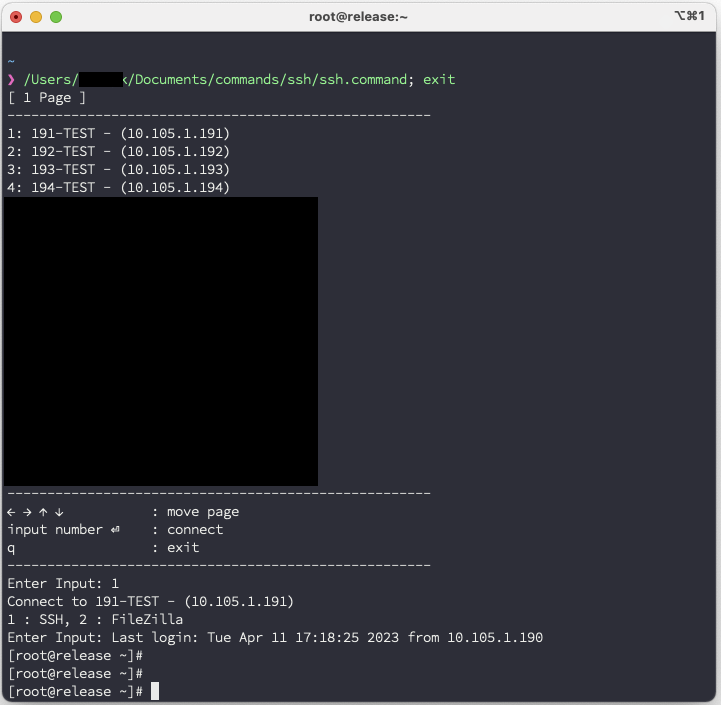

이제 도구가 준비 되었으니 hosts.properties에 관리서버들 정보만 다 입력하면
PC가 바뀌더라도 다시 입력해야되는 상황은 없어졌습니다.
그리고 서버정보를 꼭 제가 다 입력할 필요는 없죠 스크립트는 제가 짰으니 서버정보는
밑에있는 친구들에게 입력하라고 시키면 됩니다 ㅎㅎ
그리고 ssh.sh의 확장자를 .command로 바꿔주면 MacOS UI에서 더블클릭으로 스크립트를 실행할 수 있습니다.
난 윈도우PC도 사용하는데?
저는 업무용으로 맥북말고 윈도우PC도 사용을 하고 있습니다.
그래서 윈도우PC에서 사용할 스크립트도 따로 작성하였습니다.
PowerShell 스크립트로 작성하였고 윈도우에선 sshpass와 비슷한것을 찾을수가 없어
Solar-PuTTY라는 별도의 프로그램을 사용 하였습니다.
ssh.ps1
function Is-Numeric ($Value) {
    return $Value -match "^[\d\.]+$"
}

function View-Page() {
    [System.Console]::Clear()

    Write-Output "[ $($current_page + 1) Page ]"
    Write-Output "-----------------------------------------------------"

    for ($i = 0; $i -lt $count_per_page; $i++) {
        Write-Output "$($i + 1): $($names[$($current_page*$count_per_page+$i)]) - $($ips[$($current_page*$count_per_page+$i)])"

    }

    Write-Output "-----------------------------------------------------"
    Write-Output "←→↑↓             : move page"
    Write-Output "input number     : connect"
    Write-Output "q                : exit"
    Write-Output "-----------------------------------------------------"
    Write-Output "Enter Input: "

}

$scriptPath = split-path -parent $MyInvocation.MyCommand.Definition
$sshClientPath = $scriptPath+ "\Solar-PuTTY.exe"
$fileZillaPath = "C:\Program Files\FileZilla FTP Client\filezilla.exe"
$fileName = $scriptPath + "\hosts.properties"
Write-Output "Read File : $fileName"

$names = New-Object -TypeName "System.Collections.ArrayList"
$ips = New-Object -TypeName "System.Collections.ArrayList"
$ports = New-Object -TypeName "System.Collections.ArrayList"
$ids = New-Object -TypeName "System.Collections.ArrayList"
$passwords = New-Object -TypeName "System.Collections.ArrayList"

$current_page = 0
$count_per_page = 20


foreach($line in [System.IO.File]::ReadLines($fileName))
{
    $tmp = $line.Split(":")

    $names.Add($tmp[0])
    $ips.Add($tmp[1])
    $ports.Add($tmp[2])
    $ids.Add($tmp[3])
    $passwords.Add($tmp[4])
}

View-Page

while ($true) {
    $key = [System.Console]::ReadKey($false)

    if($key.Key.ToString() -eq "UpArrow") {
        if ( $current_page -gt 0 ) {
            $current_page = $($current_page - 1)
            View-Page
        }
    } elseif($key.Key.ToString() -eq "LeftArrow") {
        if ( $current_page -gt 0 ) {
            $current_page = $($current_page - 1)
            View-Page
        }
    } elseif($key.Key.ToString() -eq "DownArrow") {
        $current_page = $($current_page + 1)
        View-Page
    } elseif($key.Key.ToString() -eq "RightArrow") {
        $current_page = $($current_page + 1)
        View-Page
    } elseif($key.Key.ToString() -eq 'Q') {
        break
    }
    else {
        $connected = 0
        if(Is-Numeric $key.KeyChar) {
            $numKey = $key.KeyChar

            while ($true) {
                $key = [System.Console]::ReadKey($false)
                if(Is-Numeric $key.KeyChar) {
                    $numKey += $key.KeyChar
                } elseif ($key.Key.ToString() -eq "Enter") {
                    $connected = 1
                    $index = "$numKey" -as [int]
                    $index = $($current_page*$count_per_page+$index-1)
                    Write-Output "index : $index"
                    Write-Output "Connect to $($names[$index]) - $($ips[$index])"

                    Write-Output "1 : SSH, 2 : FileZilla"
                    Write-Output "Enter Input: "
                    $key = [System.Console]::ReadKey($false)

                    if($key.KeyChar -eq "2") {
                       & $fileZillaPath "sftp://$($ids[$index]):$($passwords[$index])@$($ips[$index]):$($ports[$index])"
                    } else {
                       & $sshClientPath -h $($ips[$index]) -o $($ports[$index]) -u $($ids[$index]) -p $($passwords[$index])
                    }

                    break;
                }
            }
        }
        if($connected -eq 1) {
            break;
        }
    }
}'프로그래밍' 카테고리의 다른 글
| Java를 활용한 Issue Tracker 제작 (0) | 2023.05.09 |
|---|---|
| SSL 인증서 변환 (0) | 2023.04.04 |